Free website vs professional: what actually changes for your business
Should you use a free website builder or invest in a professional site for your business? It's a fair question — and you're smart to ask it before spending time or money in the wrong direction. I'm Gabriele Barreca, a freelance full stack developer . It's a pattern I see regularly: business owners who tried the free route and ended up starting over. In this article, I'll walk you through the real differences — no jargon, no sales pitch — so you can make the right call for your situation. Here's the key takeaway up front: a free website and a professional website don't just differ in price. They differ in what they let you do with your business.
What you actually get with a "free" website
When we say "free website," we're talking about platforms like Wix, WordPress.com, Weebly, Google Sites, or Canva that offer a zero-cost plan. You sign up, pick a template, drag some blocks around, and within a few hours you've got a site live on the internet.
On paper, that sounds ideal. In practice, these free plans come with specific trade-offs that you should understand before committing.
The most popular free platforms and their real offering
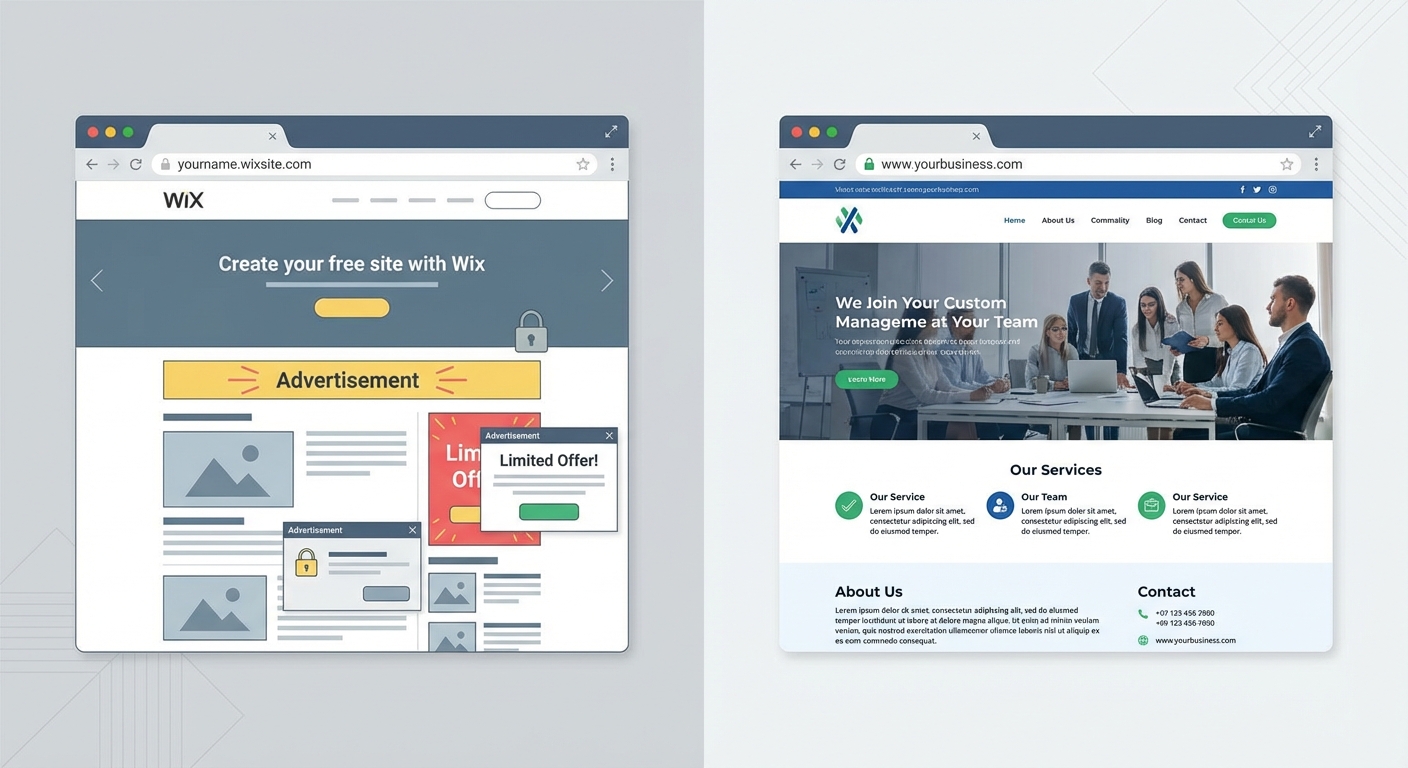
With a free plan, you typically get: a visual editor for building pages, a selection of pre-built templates, hosting on the platform's servers, and a subdomain address — something like yourname.wixsite.com or yourname.wordpress.com.
What you don't get: a custom domain (e.g., yourname.com), the ability to remove platform branding and ads, full access to SEO tools, advanced analytics, integrations with external tools, and — in most cases — dedicated support.
This trade-off makes sense for certain uses. But for a business that needs to be found on Google and project credibility to customers, the picture changes. Here's why.
7 real limitations of a free website
These aren't obscure technical issues. They're problems that directly affect how potential customers perceive your business and whether they can find you online in the first place.
Subdomain branding and first impressions
A free site gives you an address like yourbusiness.wixsite.com/my-site. Imagine putting that on a business card or reading it out over the phone.
A custom domain like yourbusiness.com immediately signals a real, established business. A platform subdomain signals the opposite: "I put this together quickly and didn't invest in it."
This isn't just about aesthetics. Google also tends to treat subdomains from website builders as less authoritative compared to independently owned domains.
Platform ads on your business site
With free plans, Wix displays a "Made with Wix" banner on every page. WordPress.com runs ads you can't control. Canva adds its watermark.
You're trying to project professionalism. Meanwhile, your website is advertising someone else's product. For a hobby project, that's fine. For a business trying to build trust, it's counterproductive.
Locked-down customization
Free templates look polished in the preview. Then you try to move an element, swap a font, or add a custom section, and discover the options are severely limited.
The result? Your site risks looking identical to thousands of others using the same template. For a restaurant, a professional practice, or a local shop, your website should reflect your brand — not the platform's.
Minimal SEO tools
This is where things get serious. With a free plan, you have little or no control over: custom page titles and meta descriptions, URL structure, redirects, XML sitemaps, site speed optimization, and structured data.
What that means: your site will struggle to show up in Google results. If your goal is to get found by people searching for your services, a site without SEO tools is like a shop with no sign on a dead-end street.
Slow performance on shared servers
Free platforms host your site on shared infrastructure alongside thousands of other sites. The result: slower load times, especially on mobile.
Why does this matter? Because 53% of mobile visitors leave a page that takes more than 3 seconds to load. And Google uses page speed as a ranking factor. You can check your site's speed with Google PageSpeed Insights.
No data ownership or portability
With a free site, your content lives on the platform's servers. If they change their terms, raise prices, or shut down the service, you risk losing everything.
Most free platforms don't allow full data export. So if you decide to move to a professional solution later, you'll likely have to rebuild from scratch.
With a professional site, the files and database are yours. You can move them to a different host anytime, with no strings attached.
Basic security, limited support
Free plans offer minimal protection: an SSL certificate (in most cases) and not much else. No customizable backups, no advanced firewall, no active monitoring.
If your site collects any contact information — even just a "request a quote" form — security matters. And support? With free plans, you typically get a knowledge base and a chatbot. With a professional developer, you get a real person who responds and fixes things.
What a professional website actually includes
A professional website isn't just "a nicer-looking site." It's a tool built to achieve specific goals: getting found on Google, projecting credibility, and turning visitors into leads.
Here's what you get when you work with a developer on a custom site:
Custom domain and reliable hosting — your web address is yourbusiness.com, hosted on a fast, stable server.
Tailored design — the site reflects your identity, not a template thousands of others are using. Every element is designed for your specific audience.
SEO built in from the ground up — URL structure, meta tags, structured data, sitemap, page speed: everything configured for Google visibility from day one.
Full analytics — Google Analytics, Search Console, conversion tracking. You know exactly how many people visit, where they come from, and what they do.
Security and maintenance — regular backups, updates, SSL certificate, protection against attacks. Your site stays online and secure.
Scalability — want to add a blog, a booking system, a members area, or an online store? A professional site is built to grow with your business.
Complete ownership — files, database, content: everything is yours. You can switch developers or hosting providers anytime without losing a thing.
To see what a complete web project looks like, check out my services.
Side-by-side comparison: free vs professional
This table sums up the key differences. Bookmark it — it'll come in handy when you're making your decision.
Feature | Free website | Professional website |
|---|---|---|
Domain | Subdomain (e.g., name.wixsite.com) | Custom (e.g., yourbusiness.com) |
Third-party ads | Yes (platform banners/watermark) | No |
Design customization | Limited (locked templates) | Full (tailored to your brand) |
SEO optimization | Basic or absent | Complete (meta, sitemap, schema, speed) |
Speed | Shared servers, variable | Optimized hosting, fast |
Analytics | Basic (recent stats only) | Full Google Analytics + Search Console |
Security | Basic SSL, no custom backups | SSL, backups, firewall, monitoring |
Data ownership | Platform's (limited export) | Yours (files + database) |
Support | FAQ/chatbot | Dedicated developer |
Scalability | Limited to platform's plans | Unlimited (blog, e-commerce, custom features) |
Upfront cost | $0 | From $1,000 to $5,000+ (project-dependent) |
Monthly cost | $0 (with limits) or $10-40 for premium | Hosting: $5-30/month + optional maintenance |
The true cost of a "free" website over time
Let's do a calculation nobody makes. Say a small business owner picks Wix free, hits the limitations after 3 months, and upgrades to the Light plan ($17/month, billed annually).
After one year on the paid plan: roughly $204. After two years: $408. After three years: $612. And at that point, they still have a template-based site with limited SEO and no file ownership.
A professional website for a small business typically costs $1,500 to $3,500 upfront (I cover this in detail in my guide on how much a website costs), plus $100-300 a year for hosting and maintenance. But it's yours, it's optimized, and you're not paying an escalating subscription to a platform that controls your site.
Over 3-5 years, the costs often converge. The difference is that with a professional site, you have an asset working for your business. With a free one, you have a placeholder.
When a free website is perfectly fine
Not every situation calls for a professional website. A free site works well if:
You're testing an idea — exploring a personal project, a hobby blog, or a temporary landing page for an event. Investing in a custom site at this stage doesn't make sense.
You don't need your site to bring in clients — if your business runs entirely on word-of-mouth and the site is just a basic digital card with your address and phone number, a free plan can work (though a custom domain for a few dollars a year would still be a worthwhile upgrade).
You're learning — if you're a student or hobbyist exploring how the web works, free platforms are an excellent testing ground.
But if your site needs to attract clients, project professionalism, and rank on Google, free isn't a shortcut — it's a dead end.
How much does a professional website cost for a small business
Based on my experience as a developer, costs for a professional site for a small business or freelancer typically fall in these ranges:
Brochure site (5-8 pages): $1,000 to $2,500. Includes custom design, basic SEO optimization, contact form, first-year hosting.
Site with blog and SEO strategy: $2,000 to $4,000. Adds an optimized blog section, advanced analytics setup, and a structure built for ranking.
Basic e-commerce site: $3,000 to $6,000+. Includes product catalog, cart, payments, and order management.
These are indicative ranges. Every project is different. To understand what your specific project would cost, the best approach is to have a conversation about it.
For a complete breakdown, read my guide on how much a website costs.
5-question checklist to make your decision
Answer these questions to figure out which path is right for you:
1. Does your website need to bring in new clients? Yes → professional site. No → free may be enough.
2. Do your competitors have professional websites? Yes → with a free site, you're already at a disadvantage. No → you have a chance to stand out by investing.
3. Do you need to show up on Google for your area or industry? Yes → you need a site with proper SEO. No → free might work.
4. Does your website represent your business to potential clients? Yes → image matters, and a platform subdomain hurts it. No → you can experiment with free.
5. Will you want to grow the site over time (blog, e-commerce, new sections)? Yes → start with a professional, scalable foundation. No → a static free site may work for now.
If you answered "yes" to 3 or more of these, a professional website is the choice that will save you time, money, and frustration in the long run.
Free platforms compared: real pricing and trade-offs
For reference, here's an overview of free plans and entry-level paid plans from the most popular platforms. Prices refer to annual billing and are current as of February 2026.
Platform | Free plan | First paid plan | Custom domain | Ads removed |
|---|---|---|---|---|
Wix | Yes (500 MB, Wix branding) | Light: $17/month | Paid plans only | Paid plans only |
WordPress.com | Yes (1 GB, WP ads) | Personal: $4/month | Paid plans only | Paid plans only |
Squarespace | No (14-day free trial) | Basic: $16/month | Included (free 1 year) | Yes, all plans |
Google Sites | Yes (unlimited) | N/A (free only) | Via Google Workspace (paid) | Yes (no ads) |
Canva | Yes (up to 5 sites) | Pro: $15/month ($119.99/year) | Pro only | Pro only |
Note: prices are in USD and may vary by location. Always check the latest pricing on the official sites: Wix, WordPress.com, Squarespace.
Google Sites is an interesting exception: it's free with no ads, but customization and SEO options are extremely limited. Custom domain mapping requires Google Workspace (a paid service). It works for an internal company page, not for a site that needs to rank on Google.
FAQ — Common questions about free vs professional websites
Is a free website good enough for a small business?
It depends on your goals. If the site is just a digital card with your address and phone number and your clients come through referrals, a free site with a custom domain (purchased separately for a few dollars a year) can work as a temporary solution. If you want the site to bring in new clients through Google, you need a professional site with SEO optimization, fast load times, and a design that builds credibility.
Can I start with a free site and switch to a professional one later?
Technically, yes. In practice, it's less straightforward than it sounds. Most free platforms don't allow full content export. When you switch to a professional site, you'll likely need to rebuild everything from scratch — design, content, structure. The time invested in the free site doesn't transfer. If you already know the site needs to grow, it's more efficient to start with the right foundation.
How much does it cost to maintain a professional website per year?
Annual maintenance for a small business website typically runs between $200 and $500. This covers hosting ($60-200/year), domain ($10-20/year), SSL (often included with hosting), and periodic updates. For a full maintenance service with backups, security monitoring, and support, expect $500-1,000/year. For a detailed breakdown, read website maintenance costs.
Will a free website rank on Google?
A free website can be indexed by Google, but ranking competitively is another story. The limitations on URLs, meta tags, speed, and structure make it extremely hard to compete with optimized professional sites. If a direct competitor has a professional site with proper SEO, your free site will remain invisible in search results.
Is a paid Wix or Squarespace plan better than a custom-built site?
Paid plans from Wix and Squarespace ($16 to $39/month) remove some free-plan limitations: you get a custom domain, no platform ads, and more design options. For a business that doesn't need advanced customization or competitive SEO, they can be a solid middle ground. The trade-off is platform lock-in, limited customization ceiling, and less control over technical SEO. For a business aiming to grow its online presence, a custom-built site delivers more control and better long-term results.
What happens to my site if the free platform shuts down or changes terms?
You risk losing everything. With a professional website, the files are yours — you can move them to any hosting provider at any time. With a free platform, you're a guest in someone else's house, and they set the rules.
You've made it this far, and you probably already know which direction makes sense for your business. If you want a website that actually works — one that shows up on Google, projects professionalism, and brings in leads — let's talk. I'll walk you through the options so you can decide with clarity.
Comments
Be the first to share your thoughts!
No comments yet
Be the first to share your thoughts!
Share your thoughts
Log in to comment on this post.
Log in to comment on this post.