How to Get Found on Google: A Practical Guide for Local Businesses
Nearly all consumers search online before visiting a local business. If your business doesn't show up when someone types "restaurant near me" or "plumber in [your city]," you're losing customers every single day — customers who end up choosing your competitors instead. Getting found on Google isn't a luxury reserved for big companies. It's a necessity for anyone running a shop, a professional practice, a restaurant, or a trade business. The good news? You don't need a massive budget. You need the right actions, done the right way. This guide shows you exactly what to do to get your local business to the top of Google search results, step by step. No unnecessary jargon, just strategies that actually work in 2026.
Why Local Visibility on Google Matters More Than Ever in 2026
Before we dive into the "how," let's understand the "why." Local searches aren't a passing trend. They're how people find businesses in their area, and the numbers are staggering.
About 76% of people who search for a local business on their smartphone visit that business within 24 hours. Roughly 28% of those searches result in a purchase. And the most telling statistic: virtually all consumers use the web to find information about local businesses before making a decision.
Here's what happens when someone searches for a service in your area:
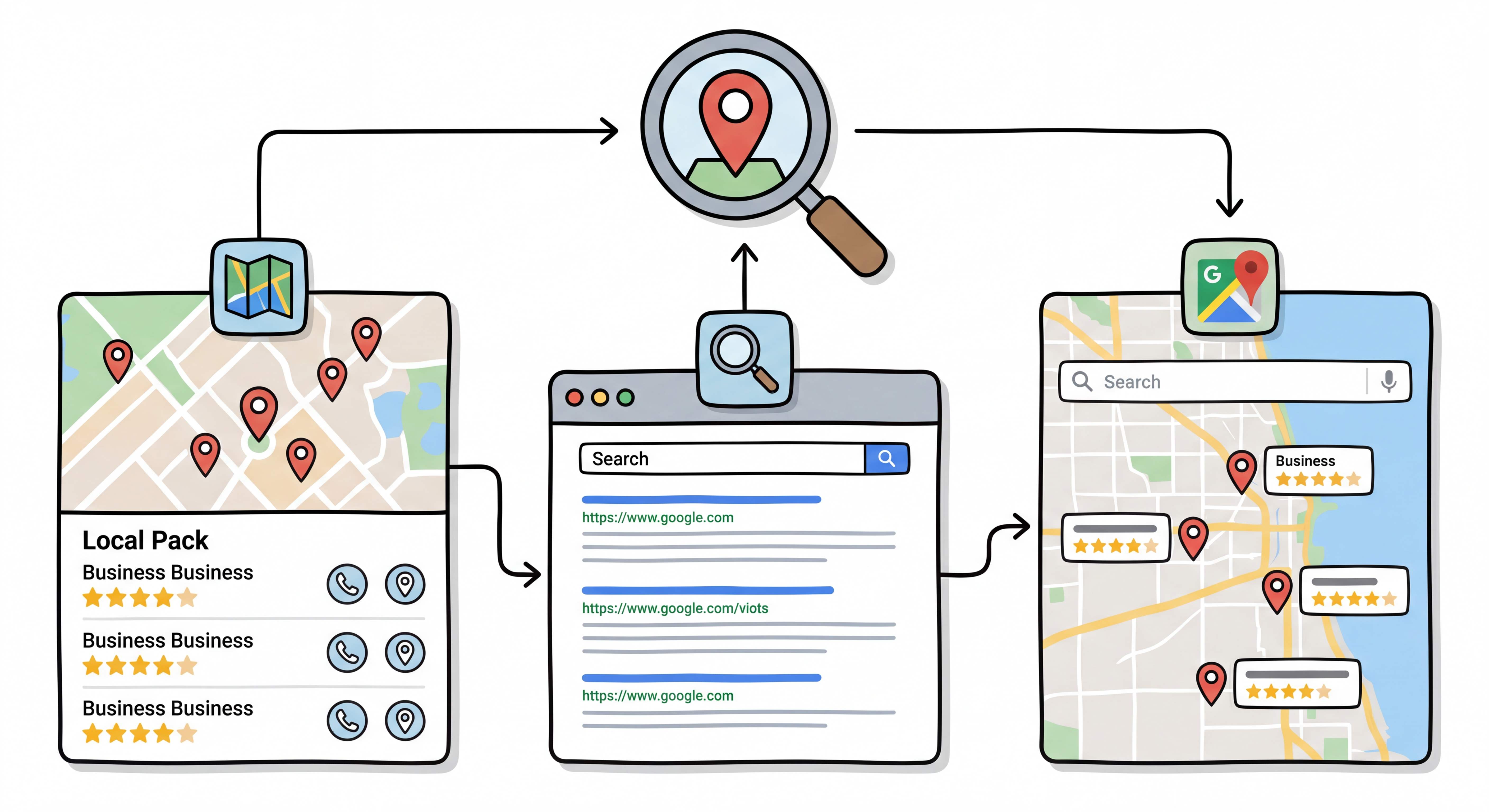
Google shows the "local pack" — that box with the map and three featured businesses that appears above all organic results. If your business is in there, it captures the majority of clicks.
Google Maps becomes the go-to reference — tourists, residents looking for services, anyone who needs something "near me" opens Maps. If you're not there, you don't exist.
Google's AI Overviews answer directly — in 2026, Google increasingly generates automatic responses powered by artificial intelligence. Businesses with well-optimized profiles get cited in these AI-generated answers.
What most people don't realize: searches with local intent convert at nearly double the rate of generic searches. Someone searching "emergency plumber [city]" has a problem to solve right now. They're not browsing out of curiosity.
How Google Works for Local Searches
To get found on Google in local searches, you need to understand how the search engine decides who to show. Google's local algorithm is built on three fundamental pillars.
Relevance: How Well You Match the Search
Google analyzes your business information to determine whether it matches what the user is looking for. If someone searches "wood-fired pizza restaurant in [city]" and you have exactly that but haven't written it anywhere, Google can't know it.
Relevance is built through complete, detailed information — on your Google Business Profile, on your website, in your service descriptions.
Distance: How Close You Are to the User
Google calculates the distance between the user and your business. If the user doesn't specify a location in their search (for example, just searching "pizza restaurant"), Google uses the device's GPS location to show the nearest businesses.
You have limited direct control over this factor. But you can influence it indirectly by creating specific pages for the areas you serve.
Prominence: How Well-Known and Respected You Are
Prominence measures your business's reputation compared to competitors. Reviews, ratings, overall notoriety, links pointing to your website, and online mentions all come into play. The better your reputation, the more likely Google is to give you a prominent position.
Step 1: Optimize Your Google Business Profile
Your Google Business Profile (formerly Google My Business) is the most powerful free tool available to get found on Google. It's your digital storefront: when someone searches for your business or a service in your area, this profile appears prominently with map, photos, hours, reviews, and contact information.
If you haven't created your profile yet, do it now. Go to business.google.com and follow the guided process. If the profile already exists (perhaps auto-generated by Google), claim it.
But here's the thing. Having a profile isn't enough — you need to optimize it thoroughly.
Essential Information (NAP)
NAP stands for Name, Address, Phone. These three pieces of data must be identical everywhere: on your Google profile, your website, online directories, and social media. Even a small difference (for example, "Street" written out in one place and abbreviated "St." in another) can confuse Google and hurt your rankings.
Check right now:
Is your business name written exactly as it appears on your signage?
Is the address complete, including postal code and city?
Is the phone number the main line, with area code?
Category and Description
Your primary category is one of the most important ranking factors for the local pack. Choose the one that best describes your core business. Then add up to nine secondary categories to expand your coverage.
In your business description, clearly explain what you do, who you serve, and where you're located. Include relevant keywords naturally. Don't keyword stuff — write for people, not for the search engine.
Photos and Visual Content
Businesses with quality photos receive up to 42% more requests for driving directions and 35% more click-throughs to their website compared to those without photos.
What to upload:
Exterior photos — the entrance, signage, and facade. These help customers recognize you when they arrive.
Interior photos — the space, the atmosphere, the work area. They convey the feeling of stepping inside your business.
Product/service photos — dishes if you're a restaurant, completed projects if you're a tradesperson, the office if you're a professional.
Team photos — they put a human face behind the business and build trust.
Update photos regularly. Google rewards active profiles, and a profile without updates for more than 30 days loses visibility.
Posts and Updates
Your Google Business Profile isn't static. You can publish posts with news, offers, events, and updates. Each post signals activity to Google and provides an opportunity to engage potential customers.
Post at least once a week. It can be simple: a new product, special hours, a useful tip for your customers.
Questions and Answers
The Q&A section of your profile is often overlooked, but it's incredibly powerful. Don't wait for customers to ask questions. Add the most common questions yourself with clear, complete answers. This content helps both Google understand your business and customers find the information they need.
Step 2: Build a Website Optimized for Local Search
Your Google Business Profile gets you into the local pack and on Maps. But to also dominate the organic results — those "blue links" below the local pack — you need a website. The two work together: the profile captures immediate attention, the website converts visitors into customers.
What many don't realize: simply having a website isn't enough. It must be specifically optimized for local searches.
Page Structure for Local Ranking
Every page on your site must clearly communicate to Google where you operate and what you offer.
Optimized title tags: The title that appears in search results should include your service and your area. For example, "Wood-Fired Pizza Restaurant in [City] | Business Name" is far better than "Home | Business Name."
Effective meta descriptions: The description below the title should encourage the click. Include your area and a call to action. For example, "Discover our Neapolitan pizza baked in a wood-fired oven. Book your table in [City]. Delivery available."
Geolocalized content: On your main pages, naturally mention your city, county/province, and region. Don't force it — integrate these geographic references into the text naturally.
Dedicated Local Pages
If you serve multiple areas, create a dedicated page for each one. For example, if you're an electrician serving three different cities, having a specific page for each dramatically increases your chances of appearing in local searches for those areas.
Caution: each local page must have unique, relevant content. Don't copy the same text and just change the city name — Google detects this and penalizes you.
Speed and Mobile
Over 60% of local searches are done on smartphones. If your site is slow or doesn't display well on mobile, you're losing customers before they even walk through the door.
Test your site with Google PageSpeed Insights and aim for a score above 90. A fast site isn't just a technical advantage — it's a direct ranking factor.
LocalBusiness Schema Markup
Schema markup is code that helps Google better understand your business information. By implementing LocalBusiness schema on your site, you communicate your name, address, phone number, business hours, services, and service area in a structured format.
This code isn't visible to visitors, but it makes a significant difference for rankings. Google uses it to connect your website to your Google Business Profile and to display rich snippets in search results.
If you're not sure how to implement it, ask your web developer to add a JSON-LD block with your business data. It's a quick task that can make a meaningful difference.
Step 3: Reviews That Make the Difference
Google reviews aren't optional. They account for roughly 9-15% of local ranking factors, but their real impact is much bigger. Reviews influence both your Google ranking and the customer's decision to choose you over a competitor.
How to Get More Reviews
The simplest and most effective way to get reviews is to ask. Not generically, but specifically and at the right moment.
Ask right after the service — when the customer is satisfied and the experience is fresh. A restaurant can ask at checkout, a professional at the end of a consultation, a tradesperson upon job completion.
Make the process easy — create a direct link to your Google review page (you can generate it from your Google Business Profile dashboard) and share it via SMS, email, or messaging apps.
Be specific in your request — instead of a generic "please leave us a review," try: "If you have a minute, we'd love to hear about your experience on Google. It really makes a difference for us."
How to Handle Negative Reviews
Negative reviews happen. What matters is how you handle them. Never ignore them — a professional, constructive response demonstrates customer care and can turn a negative experience into an opportunity.
Always respond politely, acknowledge the issue if it exists, and offer a concrete solution. Potential customers who read reviews also look at the responses — and a well-handled reply conveys professionalism.
Keywords in Reviews
Here's something few people know: Google analyzes review text to understand your business. A review that says "we had an amazing wood-fired margherita pizza at this place in [City], the staff was incredibly friendly" is far more useful for your ranking than a simple "everything was fine, 5 stars."
When requesting reviews, you can gently suggest that customers mention the specific service they used. Don't ask them to insert keywords — ask them to describe their experience. The result will be natural and effective.
Step 4: Local Citations and Directories
Local citations are mentions of your business on external sites — directories, portals, and social media. Each citation with consistent data (the famous NAP: name, address, phone) strengthens your credibility in Google's eyes.
Essential Directories
You don't need to be everywhere, but you need to be in the right places with correct information:
Yelp — important especially for restaurants and services
Facebook Business — your business profile on Facebook acts as a local citation
Bing Places — often forgotten, but Bing also feeds responses for Copilot and other AI assistants
Apple Business Connect — to appear on Apple Maps
Industry-specific directories — portals specific to your sector (for example, Healthgrades for doctors, Houzz for architects)
Local directories — your city's chamber of commerce, local business associations, community directories
The Golden Rule: Total Consistency
Your name, address, and phone number must be identical on every platform. If you change your phone number or relocate, update ALL citations. Inconsistent information confuses Google and damages your ranking.
Step 5: Local Content That Attracts Customers
A regularly updated blog with content tied to your area is one of the most powerful strategies for local ranking. Local content strengthens your site's geographic relevance in Google's eyes and captures area-specific searches.
Types of Content That Work
You don't need to write generic articles about your industry. You need to create content that connects your expertise to your territory.
Local guides — "The 5 Best Materials for Home Renovation in [Region]" if you're a construction company. "What to Consider Before Opening a Business in [City]" if you're an accountant.
Answers to local frequently asked questions — "How much does a solar panel installation cost in [City]?", "How to choose a lawyer in [Region]?" These questions are searched on Google, and if you answer them comprehensively, you can position yourself as the go-to reference in your area.
Collaborations and territorial content — Interview other local business owners, document events in your city, participate in your community. This type of content generates shares, links, and natural visibility.
Localized case studies — Share results achieved with clients in your area (with their permission). A real, local case study is worth more than a hundred keywords.
The Ideal Frequency
You don't need to publish every day. Two to four articles per month, as long as they're high quality, specific, and useful, are enough to build local authority over time. Consistency matters more than quantity.
Step 6: Optimize for Voice Search and AI in 2026
In 2026, a growing portion of local searches come through voice assistants and artificial intelligence. People ask Siri to "find me a restaurant nearby," use Google Assistant to search for services, and increasingly rely on ChatGPT or Gemini for personalized recommendations.
How to Adapt to Voice Search
Voice searches are phrased as natural questions. Nobody says "restaurant [city]" out loud — they say "where can I get a good dinner in [city] tonight?"
To capture these searches, structure your site's content with clear questions and answers. Your site's FAQ section is perfect for this. Write questions the way people would ask them out loud and answer directly in the first two to three sentences.
Preparing for AI Search
Google AI Overviews, ChatGPT, Perplexity — these tools are changing how people find information. To be cited in AI-generated answers, your business needs:
Flawless structured data — schema markup communicates to AI systems who you are, what you do, and where you're located in a format they can process directly.
Clear, specific content — AI systems extract and cite precise information. Phrases like "we offer high-quality services" mean nothing. "We install residential solar panel systems from 3 to 20 kW in [area]" is something an AI can use as an answer.
Detailed reviews — AI systems read public reviews and use them to evaluate and describe your business. The more specific and descriptive the reviews, the better.
Consistency across all channels — AI systems cross-reference information from multiple sources. If your data is consistent everywhere, your business appears more trustworthy and is more likely to be cited.
The 7 Fatal Mistakes That Prevent Your Business from Appearing on Google
Now that we've covered what to do, let's look at what NOT to do. These mistakes are common and can sabotage even the best local ranking strategy.
Not verifying your Google Business Profile. If the profile isn't verified, it doesn't appear in results. Complete the verification process (in 2026, this is primarily video-based) before anything else.
Incomplete or inconsistent information. Generic categories, empty description, outdated hours, phone number that differs between website and profile. Every gap is a missed opportunity.
Not having a website. A Google Business Profile alone is a good start, but without a website you miss organic results and the ability to tell your story in depth. A website is the only platform you control 100%.
Website not optimized for mobile. A site that doesn't work well on smartphones in 2026 is like a store with the door locked. The majority of local searches happen on mobile.
Ignoring reviews. Not asking for reviews and not responding to those received (especially negative ones) is one of the costliest mistakes. Reviews influence both ranking and the customer's decision.
Lack of local content. A site with no references to your area doesn't tell Google where you operate. Without geolocalized content, you're competing against the entire web instead of just competitors in your city.
Expecting instant results. Local SEO isn't an on/off switch. Results come within one to three months of consistent work. Those who give up after two weeks miss the opportunity to build a presence that generates clients for years.
Your Action Plan: What to Do Month by Month
Here's a practical plan for the first three months. Don't try to do everything at once — follow the order and dedicate the right time to each phase.
Month 1: The Foundation
Create or claim your Google Business Profile and complete verification
Fill in every single field: categories, description, hours, services
Upload at least 10 quality photos (exterior, interior, products/services, team)
Verify NAP consistency across website, social media, and main directories
If you don't have a website, start planning one
Month 2: Building Your Presence
Register your business on major directories (Yelp, Facebook Business, Bing Places, Apple Business Connect)
Start asking satisfied customers for reviews (goal: 5-10 new reviews)
Publish your first weekly post on Google Business Profile
Optimize your site's main pages with local title tags and meta descriptions
Implement LocalBusiness schema markup on your website
Month 3: Accelerating Growth
Publish your first local content piece on the blog (guide, FAQ, or case study)
Respond to all reviews received (positive and negative)
Add 3-5 frequently asked questions to your Google profile's Q&A section
Analyze initial data in Google Search Console and Google Business Insights
Plan next month's content based on the keywords driving traffic
How Long Does It Take to See Results?
This is the question everyone asks. The honest answer: it depends on competition in your area and industry.
A business in a low-competition sector (for example, a specialized service in a small city) can see significant improvements within four to six weeks. A business in a competitive industry (restaurants in a tourist city, lawyers in a major metro area) might need three to six months of consistent work.
But here's the fundamental point: local ranking is an investment that compounds over time. Every review, every piece of content, every optimization builds a competitive advantage that becomes increasingly difficult for competitors to replicate.
Frequently Asked Questions
How much does it cost to get found on Google?
Creating and optimizing a Google Business Profile is completely free. Costs arise when you want a professional website (which can range from a few hundred to several thousand dollars, depending on complexity) and when you invest in professional content and SEO. But the basics — Google profile, reviews, directories — are accessible on any budget.
Can I get found on Google without a website?
Yes, a Google Business Profile alone lets you appear in the local pack and on Maps. However, without a website you miss organic results, the ability to publish content, and full control over your online presence. Your website is the only digital space you truly own.
Google Business Profile or Google My Business: What's the difference?
None. Google My Business is the old name for the same tool, rebranded to Google Business Profile in 2022. If you find guides referring to "Google My Business," the information is still valid — only the name changed.
How often should I update my Google profile?
Update your profile whenever important information changes (hours, services, contact details). Additionally, publish at least one post per week and upload new photos at least once a month. Active profiles are rewarded by Google with greater visibility.
Does local SEO work for service-area businesses?
Absolutely. Google Business Profile supports businesses without a public-facing physical location — you can indicate the area you serve without displaying your address. This is perfect for plumbers, electricians, consultants, personal trainers, and anyone who works at the client's location.
How do I know if my strategy is working?
Regularly check Google Business Profile Insights (how many people see your profile, request directions, and call) and Google Search Console (which keywords you appear for, impressions, and clicks). If the numbers grow month over month, the strategy is working.
Conclusion: The Best Time to Start Is Right Now
Getting found on Google isn't a project with an end date. It's an ongoing process that, once started, generates customers consistently and predictably. Every week you wait is a week your competitors are building their online presence while you fall behind.
The actions to take are clear. Start with your Google Business Profile, build a website that communicates where you are and what you do, collect reviews, and create useful content for your area. You don't need to be perfect from day one — you need to start and improve consistently.
If you want to understand where your Google visibility stands today and what you can do to improve it, contact me for a free analysis of your online presence. I'll show you exactly where you are today and what to do to get found by customers in your area.
This article is part of a series dedicated to online visibility for local businesses. Also read: How Much Does a Website Cost in 2026.
Comments
Be the first to share your thoughts!
No comments yet
Be the first to share your thoughts!
Share your thoughts
Log in to comment on this post.
Log in to comment on this post.